Internet access on the road is very important to us. We carry Cellular Signal Boosters (both 3G and 4G) and a WiFi extender that gets used nearly everywhere we go. Internet access via WiFi provided by RV parks is nearly always a hit or miss proposition. Most parks simply don’t provide enough bandwidth to share it among many users. Even in parks that have adequate bandwidth, the problem becomes getting a WiFi signal across the park, through aluminum RV’s, trees and buildings. Our Ubuiquiti Networks NanoStation provides a directional WiFi extender that assists in both long distance and blocked scenerios.
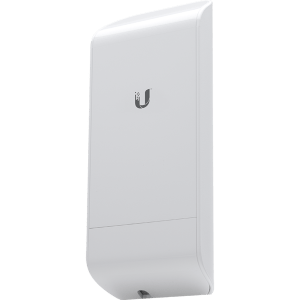
Ubiquiti NanoStation locoM2
The system is made up of two WiFi components, one that connects to the parks WiFi and one that provides WiFi connections to our devices inside our RV. The “park-side” radio is the NanoStation loco M2.
This radio can be placed in a window that can “see” the parks WiFi antenna, or raised on top of a flag pole to get a better shot over other RVs that are blocking the signal. This radio is connected to the parks WiFi system using their unique name and password.
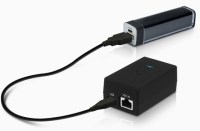
Ubiquiti airGateway
The “internal” side is handled by a Ubuiquiti airGateWay. This WiFi access point provides WiFi connections to all of our devices: phones, laptops, a wireless printer, the streaming connection for a Visio TV and Roku streaming sticks. The advantage of this gateway is that it’s name never changes – our WiFi devices all use the same name and same password regardless of what park WiFi system we connect to.
In addition to these two radios, you’ll need a network cable to connect them. A 25′ flat ethernet cable works well if you are hoisting the radio up on a flag pole and then running the wire back in through a window. There’s also a short cable that links the power adapter to the airGateWay. All in, you should spend about $140 for all items below.
Here’s the complete parts list:
- Ubiquiti NanoStation locoM2
- NanoStation window/wall suction cup mount
- Ubiquiti airGateway
- 25′ network cable
- 3′ network cable
(note, these are monetized Amazon links – we make a small commission each time you buy using one of our links. We appreciate your support!)
Configuring your network
While the configuration for this equipment isn’t tival, it’s not difficult if you have a basic knowledge of how WiFi networks and routers operate. In simplest terms, you configure the NanoStation to “join” the park WiFi system, and then route it through your internal, secure network supported by the airGateWay.
For a complete, step-by-step configuration check out David Bott’s video from his blog outsideourbubble.com on YouTube: Inexpensive RV Park to Private RV Wi Fi Setup


